
cmux
開源終端,專為
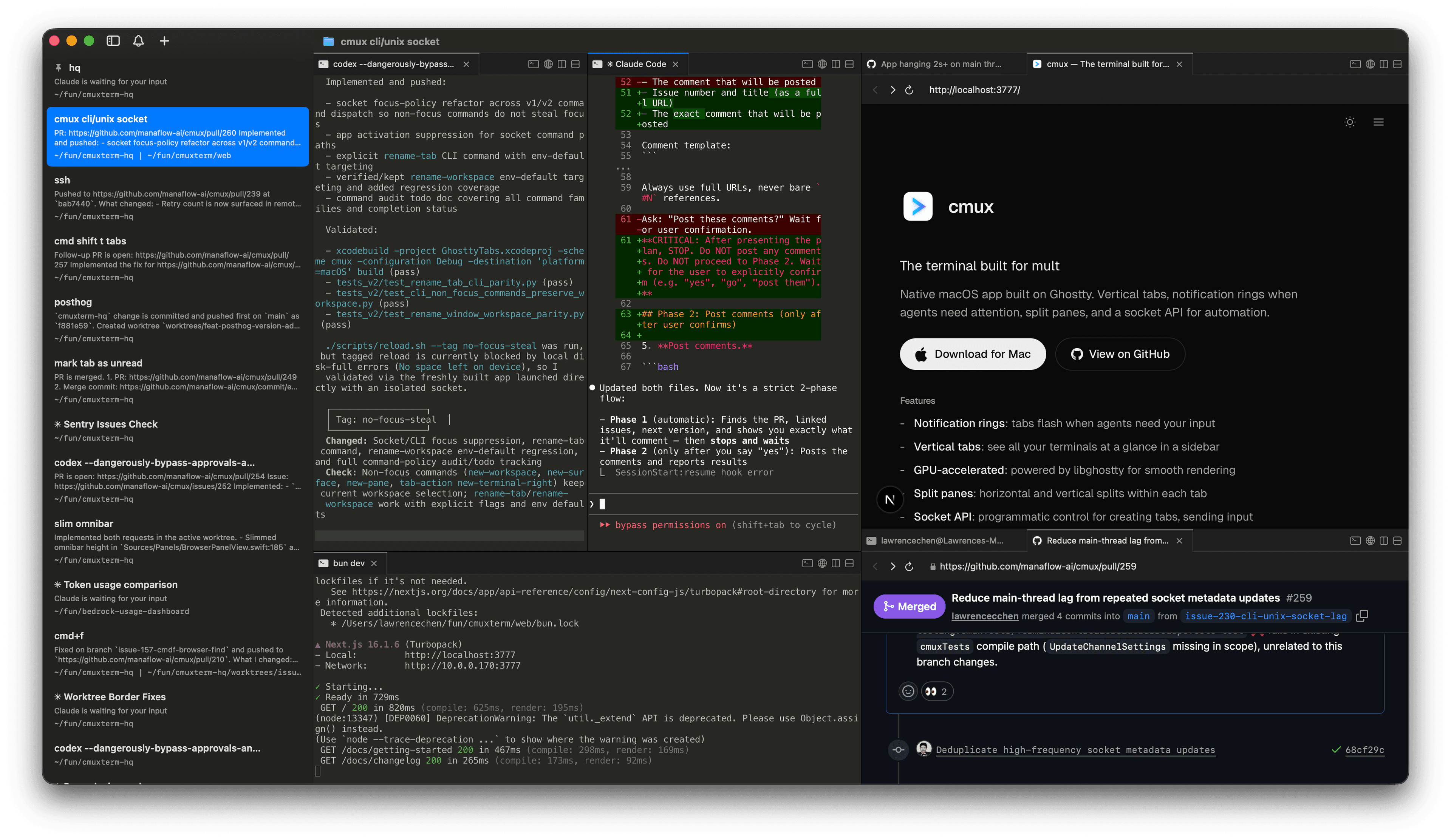
基於 Ghostty 的原生 macOS 終端應用程式。開源免費。垂直分頁、代理需要注意時的通知環、分割窗格,以及用於自動化的 socket API。
功能
- -垂直分頁:側邊欄顯示 git 分支、工作目錄、連接埠和通知文字
- -通知環:當代理需要注意時,窗格會亮起
- -內建瀏覽器:在終端機旁分割一個瀏覽器,並提供可編寫腳本的 API
- -分割窗格:每個分頁內支援水平和垂直分割
- -可編寫腳本:提供 CLI 和 socket API,用於自動化和腳本編寫
- -GPU 加速:由 libghostty 驅動,提供流暢的渲染效果
- -輕量化:原生 Swift + AppKit,無 Electron
- -鍵盤快捷鍵:豐富的快捷鍵,涵蓋工作區、分割、瀏覽器等功能
常見問題
cmux 和 Ghostty 有什麼關係?
cmux 不是 Ghostty 的分支。它使用 libghostty 作為終端機渲染的函式庫,就像應用程式使用 WebKit 來顯示網頁一樣。Ghostty 是一個獨立的終端機;cmux 是建立在其渲染引擎之上的不同應用程式。
支援哪些平台?
目前僅支援 macOS。cmux 是原生的 Swift + AppKit 應用程式。
cmux 支援哪些程式碼代理?
全部都支援。cmux 是一個終端機,所以任何在終端機中執行的代理都能直接使用:Claude Code、Codex、OpenCode、Gemini CLI、Kiro、Aider、Goose、Amp、Cline、Cursor Agent,以及任何你能從命令列啟動的工具。
通知是如何運作的?
當程序需要注意時,cmux 會在窗格周圍顯示通知環、在側邊欄顯示未讀徽章、顯示通知彈出視窗,以及 macOS 桌面通知。這些通知會透過標準終端機跳脫序列(OSC 9/99/777)自動觸發,你也可以透過 cmux CLI 和 Claude Code hooks 手動觸發。
可以自訂鍵盤快捷鍵嗎?
終端機按鍵綁定從你的 Ghostty 設定檔(~/.config/ghostty/config)讀取。cmux 專屬的快捷鍵(工作區、分割、瀏覽器、通知)可以在「設定」中自訂。請參閱預設快捷鍵以獲取完整列表。
和 tmux 相比如何?
tmux 是一個在任何終端機內執行的終端機多工器。cmux 是一個帶有圖形介面的原生 macOS 應用程式:垂直分頁、分割窗格、內建瀏覽器和 socket API 全部內建。不需要設定檔或前綴鍵。
cmux 是免費的嗎?
是的,cmux 可以免費使用。原始碼可在 GitHub 上取得。
社群
- "Another day another libghostty-based project, this time a macOS terminal with vertical tabs, better organization/notifications, embedded/scriptable browser specifically targeted towards people who use a ton of terminal-based agentic workflows." — 又一個基於 libghostty 的專案,這次是一個帶垂直分頁、更好的組織/通知、內建可編寫腳本瀏覽器的 macOS 終端機,專門針對大量使用終端機 agent 工作流程的使用者。 —
 Mitchell Hashimoto, Creator of Ghostty and founder of HashiCorp
 - "This is exactly the product I've been looking for. After two hours this am I've in love." — 這正是我一直在找的產品。用了兩小時就愛上了。 —
 Nick Schrock, Creator of Dagster. GraphQL co-creator.
 - "I've been using this all weekend and it's amazing." — 整個週末都在用,太棒了。 —
 Edward Grefenstette, Director of Research at Google DeepMind
 - "this has been my favorite tool for past two weeks" — 過去兩週最喜歡的工具 —
 Max Forsey
 - "cmux 良さそうすぎてついにバイバイ VSCode するときなのかもしれない" — cmux 看起來太棒了,也許終於到了告別 VSCode 的時候 —
 あさざ
あさざ - "Hey, this looks seriously awesome. Love the ideas here, specifically: the programmability, layered UI, browser w/ api. Looking forward to giving this a spin. Also want to add that I really appreciate Mitchell Hashimoto creating libghostty; it feels like an exciting time to be a terminal user." — 看起來真的很厲害。喜歡這些想法:可程式化、分層 UI、帶 API 的瀏覽器。期待試用。也想說非常感謝 Mitchell Hashimoto 創建了 libghostty,作為終端機使用者感覺現在是個令人興奮的時代。 —johnthedebs
- "Vertical tabs in my terminal 🤤 I never thought of that before. I use and love Firefox vertical tabs." — 終端機裡的垂直分頁!之前從沒想過。我用 Firefox 垂直分頁用得很開心。 —
 Joe Riddle
 - "Gave this a run and it was pretty intuitive. Good work!" — 試了一下,很直覺。做得好! —dchu17
- "I like it, ran it in the past day on three parallel projects each with several worktrees. Having this paired with lazygit and yazi / nvim made me a bit more productive than usual without having to chase multiple ghostty / iTerm instances. Also feels more natural than tmux." — 很喜歡,過去一天在三個並行專案上用了,每個都有多個 worktree。搭配 lazygit 和 yazi/nvim,比以前高效多了,不用在多個 Ghostty/iTerm 執行個體之間切換。比 tmux 也更自然。 —afruth
- "cmux良さそうなので入れてみたけれど、良い" — 試了 cmux,確實不錯 —
 Norihiro Narayama
 - "cmux is pretty good." — cmux 蠻好用的。 —
 Kishore Neelamegam
 - "cmux.dev に乗り換えた" — 換到 cmux.dev 了 —
 かたりん
かたりん - "This has been such a useful find. I can't recommend it enough." — 非常有用的發現。強烈推薦。 —
 Scott Watermasysk
 - "grabbed this over the weekend and loved it. been waiting for something like this." — 週末用了,很喜歡。一直在等這樣的工具。 —
 John Blythe
 - "This is exactly what I've wanted. Amazing job thank you!" — 這正是我想要的。做得太好了,謝謝! —
 Christopher
 - "Been using this for a week and it's fantastic. Vert tab for each WIP task. Inside, claudes on one side and browser with PR and resources on the other, switch between tasks and stay organized. Mix that with skills to have Claude watch CI recursively, etc. feeling enlightened tbh" — 用了一週,非常棒。每個進行中的任務一個垂直分頁。裡面一邊是 Claude,另一邊是瀏覽器看 PR 和資料,在任務之間切換保持有序。搭配 skill 讓 Claude 遞迴監控 CI 等等。感覺開悟了。 —
 Connor
 - "年初にWarpからGhosttyに乗り換えたけど、今はcmuxに乗り換えた💻 垂直タブが便利で、Claude Codeのタスクの終了が通知されるのがありがたい。Ghosttyベースだから爆速動作はそのまま。ghosttyでやったブランチ表示や補完もそのまま使える" — 年初從 Warp 換到 Ghostty,現在又換到了 cmux。垂直分頁很方便,Claude Code 任務完成時收到通知很實用。基於 Ghostty 所以依然飛快。之前在 Ghostty 裡設定的分支顯示和補全也都能用。 —
 鹿野 壮 Takeshi Kano