
cmux
次のために作られたターミナル:
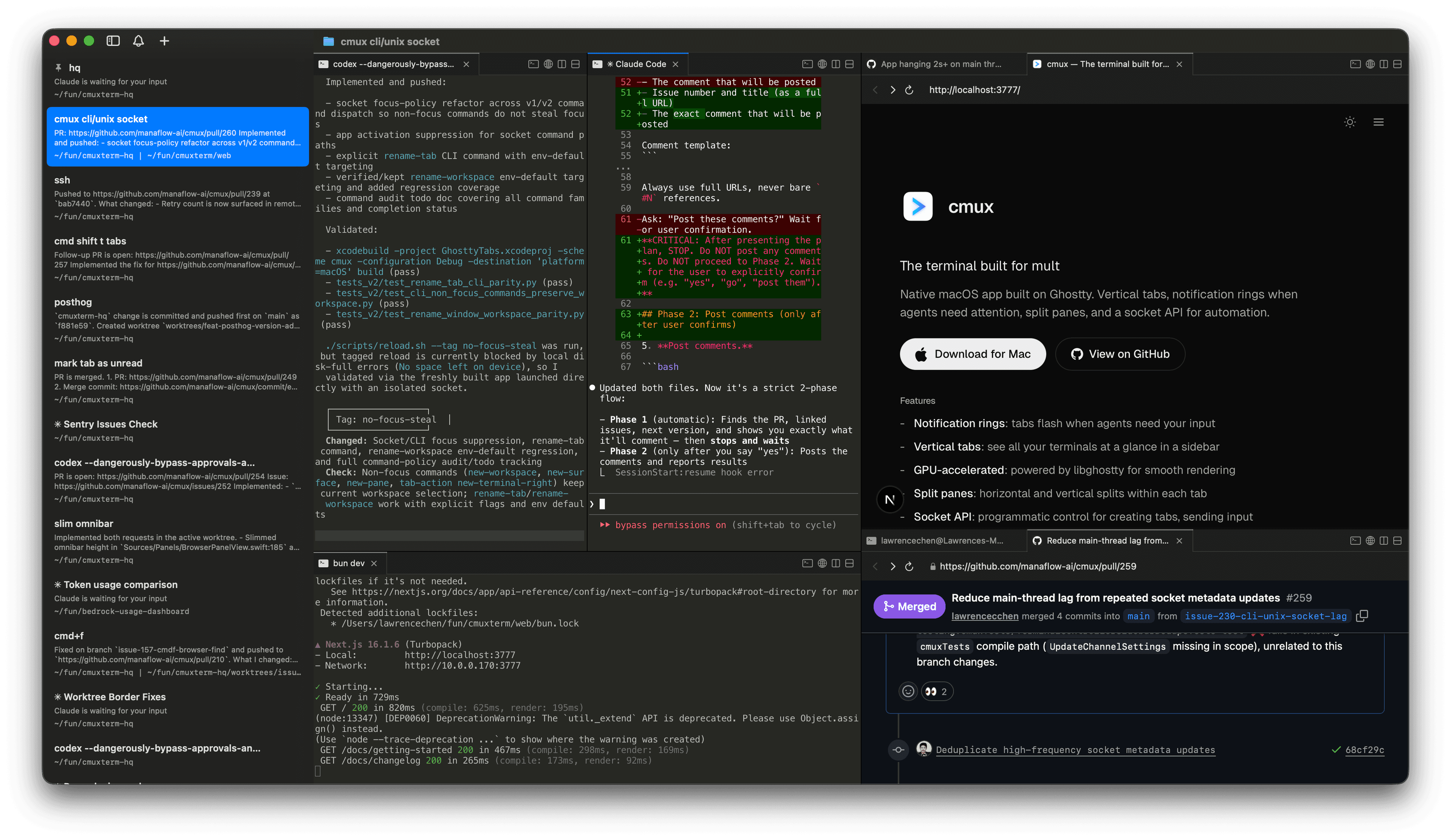
GhosttyベースのネイティブmacOSアプリ。縦タブ、エージェントが注意を必要とするときの通知リング、分割ペイン、自動化用のsocket APIを搭載。
機能
- -縦タブ:サイドバーにgitブランチ、作業ディレクトリ、ポート、通知テキストを表示
- -通知リング:エージェントが注意を必要とするとペインが点灯
- -アプリ内ブラウザ:スクリプタブルなAPIでターミナルの横にブラウザを分割表示
- -分割ペイン:各タブ内で水平・垂直に分割
- -スクリプタブル:CLIとsocket APIで自動化とスクリプティングが可能
- -GPU高速化:libghosttyによるスムーズなレンダリング
- -軽量:ネイティブSwift + AppKit、Electronではない
- -キーボードショートカット:ワークスペース、分割、ブラウザなどの豊富なショートカット
FAQ
cmuxとGhosttyの関係は?
cmuxはGhosttyのフォークではありません。アプリがWebKitをWebビューに使うのと同様に、ターミナルレンダリングのライブラリとしてlibghosttyを使用しています。Ghosttyはスタンドアロンのターミナルで、cmuxはそのレンダリングエンジンの上に構築された別のアプリです。
対応プラットフォームは?
現在はmacOSのみです。cmuxはネイティブSwift + AppKitアプリです。
cmuxはどのコーディングエージェントに対応していますか?
すべてに対応しています。cmuxはターミナルなので、ターミナルで動作するすべてのエージェントがそのまま使えます:Claude Code、Codex、OpenCode、Gemini CLI、Kiro、Aider、Goose、Amp、Cline、Cursor Agent、その他コマンドラインから起動できるすべてのツール。
通知はどのように機能しますか?
プロセスが注意を必要とするとき、cmuxはペインに通知リング、サイドバーに未読バッジ、通知ポップオーバー、macOSデスクトップ通知を表示します。これらは標準的なターミナルエスケープシーケンス(OSC 9/99/777)で自動的に発火するほか、cmux CLIやClaude Codeフックで手動トリガーも可能です。
キーボードショートカットはカスタマイズできますか?
ターミナルのキーバインドはGhosttyの設定ファイル(~/.config/ghostty/config)から読み込まれます。cmux固有のショートカット(ワークスペース、分割、ブラウザ、通知)は設定画面でカスタマイズできます。全一覧はデフォルトショートカットをご覧ください。
tmuxとの違いは?
tmuxはどのターミナル内でも動作するターミナルマルチプレクサです。cmuxはGUI付きのネイティブmacOSアプリで、縦タブ、分割ペイン、組み込みブラウザ、socket APIがすべて内蔵されています。設定ファイルやプレフィックスキーは不要です。
cmuxは無料ですか?
はい、cmuxは無料で使えます。ソースコードはGitHubで公開されています。
コミュニティ
- "Another day another libghostty-based project, this time a macOS terminal with vertical tabs, better organization/notifications, embedded/scriptable browser specifically targeted towards people who use a ton of terminal-based agentic workflows." — またlibghosttyベースのプロジェクトが登場。今回は縦タブ付きのmacOSターミナルで、ターミナルベースのAIエージェントワークフローを大量に使う人向けに、整理・通知機能や組み込み・スクリプタブルなブラウザを搭載。 —
 Mitchell Hashimoto, Creator of Ghostty and founder of HashiCorp
 - "This is exactly the product I've been looking for. After two hours this am I've in love." — まさに探していた製品です。今朝2時間使って、もう夢中です。 —
 Nick Schrock, Creator of Dagster. GraphQL co-creator.
 - "I've been using this all weekend and it's amazing." — 週末ずっと使ってたけど、すごくいい。 —
 Edward Grefenstette, Director of Research at Google DeepMind
 - "this has been my favorite tool for past two weeks" — この2週間で一番お気に入りのツール —
 Max Forsey
 - "cmux 良さそうすぎてついにバイバイ VSCode するときなのかもしれない" —
 あさざ
あさざ - "Hey, this looks seriously awesome. Love the ideas here, specifically: the programmability, layered UI, browser w/ api. Looking forward to giving this a spin. Also want to add that I really appreciate Mitchell Hashimoto creating libghostty; it feels like an exciting time to be a terminal user." — これ、ガチですごいですね。特にプログラマビリティ、レイヤードUI、APIつきブラウザが気に入りました。早く試してみたい。あとMitchell Hashimotoがlibghosttyを作ってくれたことにも感謝。ターミナルユーザーにとってワクワクする時代ですね。 —johnthedebs
- "Vertical tabs in my terminal 🤤 I never thought of that before. I use and love Firefox vertical tabs." — ターミナルに縦タブ!考えたことなかった。Firefoxの縦タブは愛用してるのに。 —
 Joe Riddle
 - "Gave this a run and it was pretty intuitive. Good work!" — 試してみたけど、かなり直感的だった。良い仕事してますね! —dchu17
- "I like it, ran it in the past day on three parallel projects each with several worktrees. Having this paired with lazygit and yazi / nvim made me a bit more productive than usual without having to chase multiple ghostty / iTerm instances. Also feels more natural than tmux." — 気に入った。昨日3つのプロジェクトをそれぞれ複数のworktreeで並行作業した。lazygitやyazi/nvimと組み合わせると、複数のghostty/iTermインスタンスを追いかけなくても普段より生産性が上がった。tmuxより自然な感じ。 —afruth
- "cmux良さそうなので入れてみたけれど、良い" —
 Norihiro Narayama
 - "cmux is pretty good." — cmux、かなりいい。 —
 Kishore Neelamegam
 - "cmux.dev に乗り換えた" —
 かたりん
かたりん - "This has been such a useful find. I can't recommend it enough." — 本当に便利な発見だった。みんなにおすすめしたい。 —
 Scott Watermasysk
 - "grabbed this over the weekend and loved it. been waiting for something like this." — 週末に入れて気に入った。こういうのをずっと待ってた。 —
 John Blythe
 - "This is exactly what I've wanted. Amazing job thank you!" — まさに欲しかったもの。最高です、ありがとう! —
 Christopher
 - "Been using this for a week and it's fantastic. Vert tab for each WIP task. Inside, claudes on one side and browser with PR and resources on the other, switch between tasks and stay organized. Mix that with skills to have Claude watch CI recursively, etc. feeling enlightened tbh" — 1週間使ってるけど最高。WIPタスクごとに縦タブ。中にはClaudeを片側に、PRやリソースのブラウザをもう片側に。タスクを切り替えながら整理できる。スキルでClaudeにCIを再帰的に監視させたり。正直、悟りを開いた気分。 —
 Connor
 - "年初にWarpからGhosttyに乗り換えたけど、今はcmuxに乗り換えた💻 垂直タブが便利で、Claude Codeのタスクの終了が通知されるのがありがたい。Ghosttyベースだから爆速動作はそのまま。ghosttyでやったブランチ表示や補完もそのまま使える" —
 鹿野 壮 Takeshi Kano